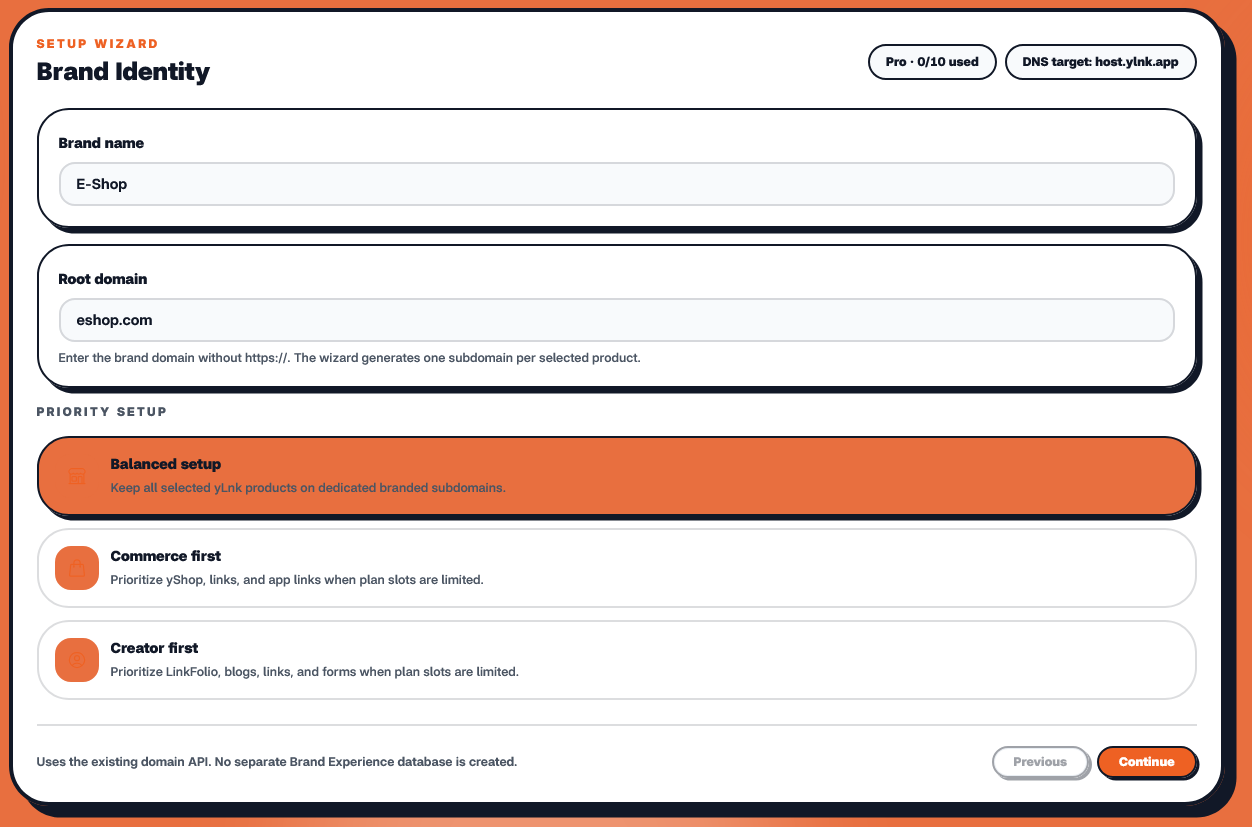
🌐 Brand Experience Setup: One Domain. Your Entire Brand.
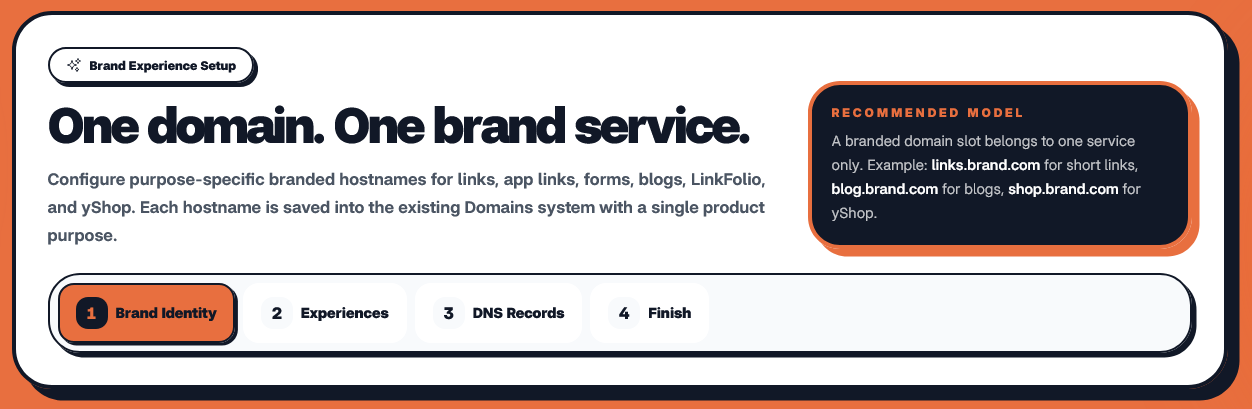 Your brand already has a domain.
Why should every digital service feel like it belongs somewhere else?
With yLnk Brand Experience, you can take one domain — such as mybrand.com — and organize your links, app links, forms, blog, LinkFolio, and store into purpose-specific branded spaces.
💡 The idea is simple:One domain. Multiple experiences. One brand identity.
For example:
mybrand.com
│
├── links.mybrand.com    → 🔗 Short Links
├── apps.mybrand.com     → 📱 App Links
├── forms.mybrand.com    → 📋 Forms
├── blog.mybrand.com     → 📝 Blog
└── store.mybrand.com    → 🛍️ yShop
And depending on your business type, the root domain itself can become the primary experience.
For an e-commerce brand:
mybrand.com          → 🛍️ Store
links.mybrand.com    → 🔗 Links
apps.mybrand.com     → 📱 App Links
forms.mybrand.com    → 📋 Forms
blog.mybrand.com     → 📝 Blog
For a creator:
mybrand.com          → 👤 LinkFolio
links.mybrand.com    → 🔗 Links
apps.mybrand.com     → 📱 App Links
forms.mybrand.com    → 📋 Forms
blog.mybrand.com     → 📝 Blog
You choose the priority. yLnk builds the structure.
🧩 What Is Brand Experience?
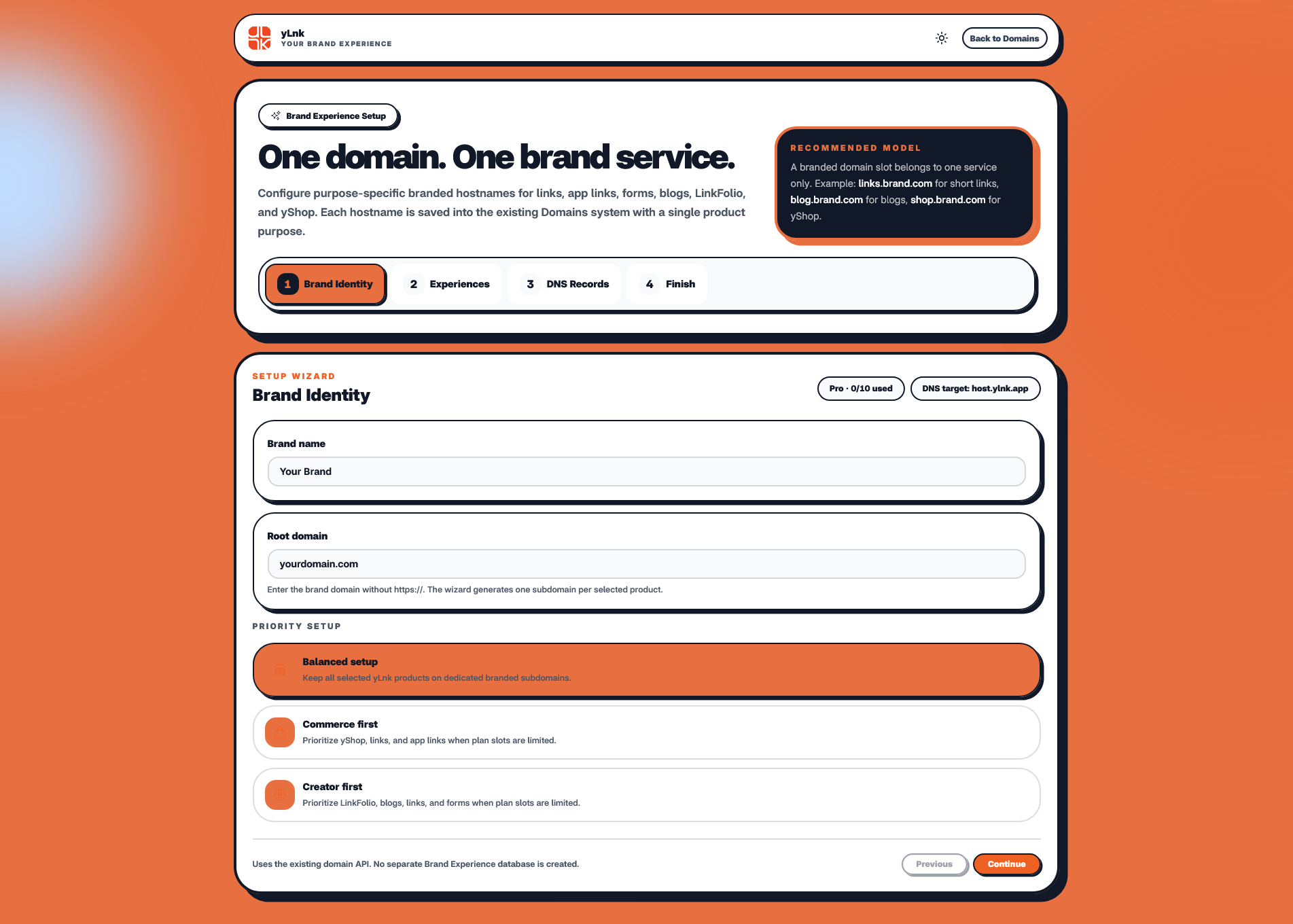 Brand Experience is a setup wizard that helps you organize multiple yLnk services around one branded domain.
Instead of managing unrelated service URLs, you can create a consistent structure such as:
Branded Hostname & Purpose
links.mybrand.com🔗 Short Links
apps.mybrand.com📱 App / Dynamic Links
forms.mybrand.com📋 Forms
blog.mybrand.com📝 Blog
store.mybrand.com🛍️ yShop
Each branded hostname has one clear product purpose.
This keeps the architecture predictable, recognizable, and easy to manage.
① 🪪 Brand Identity
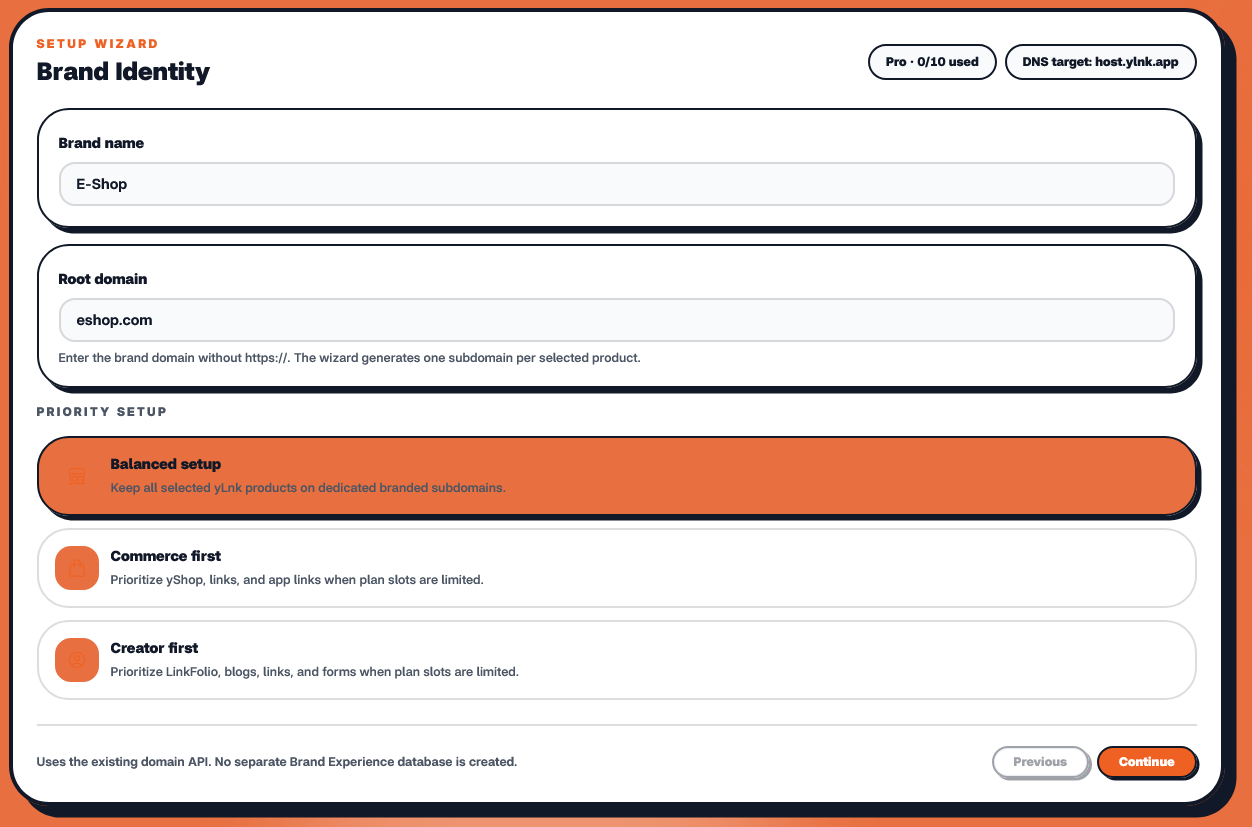 Everything starts with your brand.
The first step of the wizard asks for two things:
🏷️ Brand Name
Enter the name people know your business, creator profile, organization, or project by.
For example:
My Brand
🌐 Root Domain
Then enter the domain you want to build your Brand Experience around:
mybrand.com
No https://.
No paths.
Just the domain.
💡 Tip: Use a domain you already own and control through your DNS provider.
🎯 Choose Your Priority
Your brand may not have the same priority as someone else's.
That's why yLnk provides three setup approaches:
⚖️ Balanced Setup
Keep all selected yLnk products on their own branded subdomains.
links.mybrand.com
apps.mybrand.com
forms.mybrand.com
blog.mybrand.com
store.mybrand.com
Best when you want a clean separation between services.
🛍️ Commerce First
Put your store at the center of your brand.
mybrand.com → yShop
Then use dedicated subdomains for supporting services:
links.mybrand.com
apps.mybrand.com
forms.mybrand.com
blog.mybrand.com
Perfect for businesses where the storefront is the primary destination.
👤 Creator First
Put your LinkFolio at the center.
mybrand.com → LinkFolio
Then keep the supporting services organized around it.
This works particularly well for creators, musicians, freelancers, influencers, and personal brands.
② 🧱 Build Your Branded Spaces
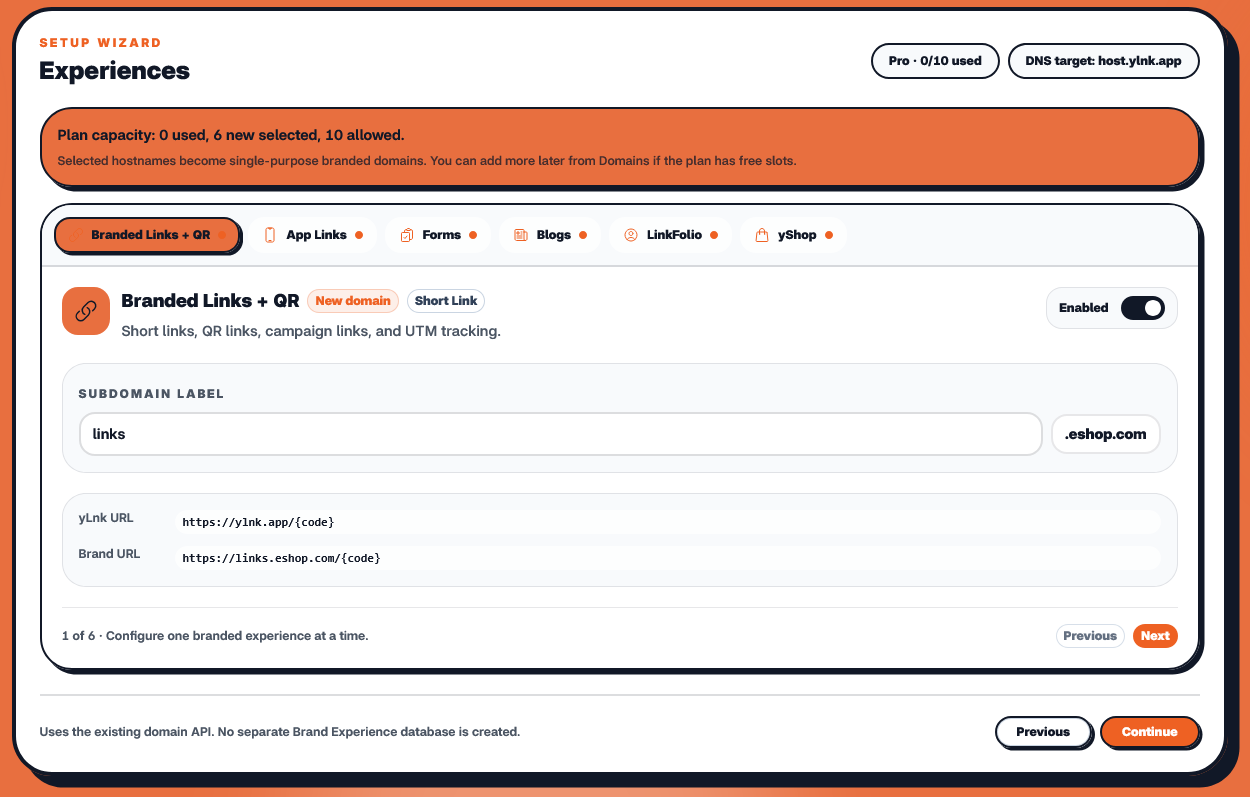 Once your identity is configured, yLnk generates the branded hostnames based on the products you've selected.
For example:
mybrand.com
links.mybrand.com
apps.mybrand.com
forms.mybrand.com
blog.mybrand.com
store.mybrand.com
Each one has a single responsibility.
🔗 links.mybrand.com
Your branded short links and redirects.
📱 apps.mybrand.com
Your app and dynamic-link experiences.
📋 forms.mybrand.com
Your forms and surveys.
📝 blog.mybrand.com
Your branded content and blog.
🛍️ store.mybrand.com
Your yShop storefront.
🚀 The result: every service gets its own recognizable address while remaining part of the same brand.
③ 🌐 Connect Your DNS
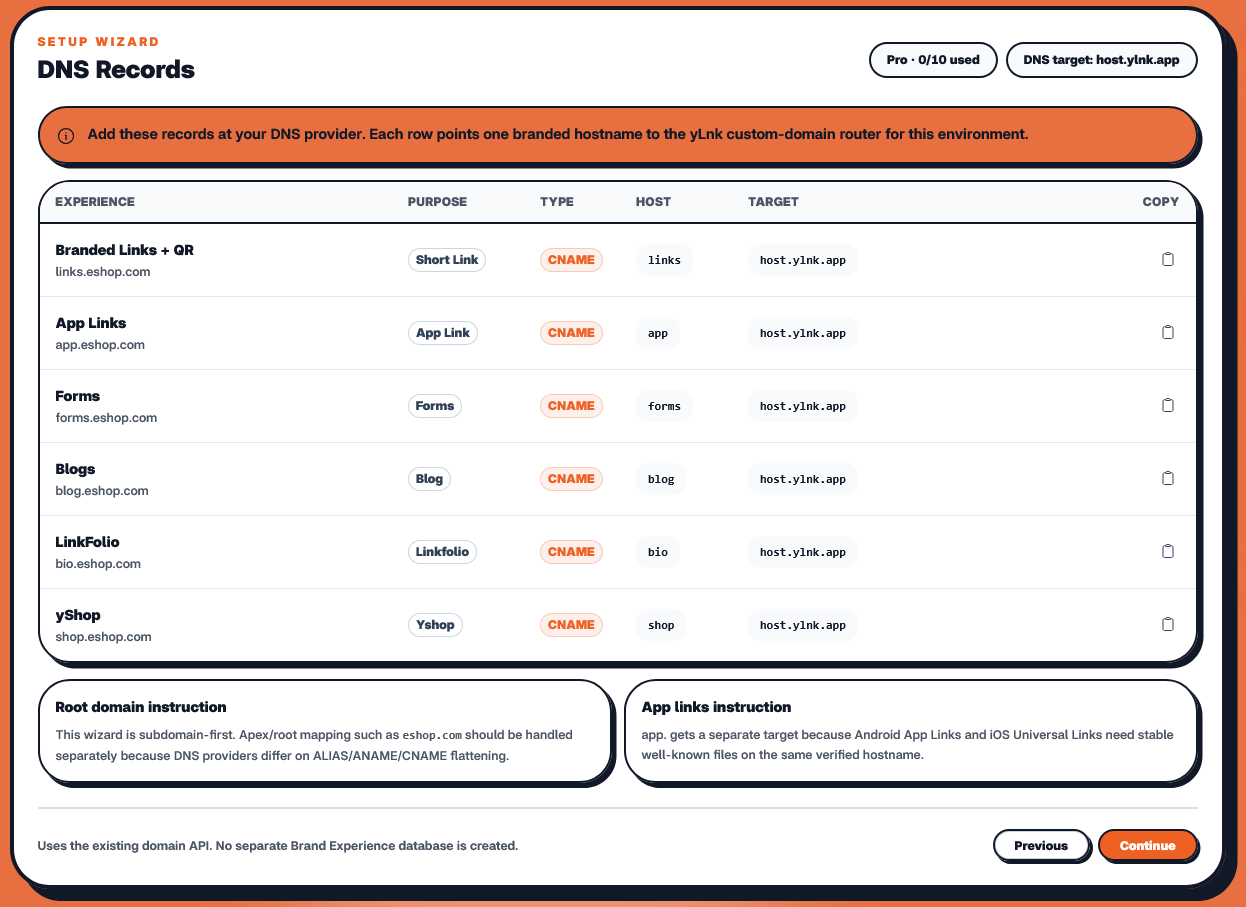 Now your domain needs to point to yLnk.
This is where your DNS provider comes in.
Whether you use Cloudflare, Namecheap, GoDaddy, Route 53, or another DNS provider, the process follows the same basic principle.
Your DNS records connect your branded hostnames to yLnk:
links.mybrand.com
        │
        │ DNS
        ▼
    yLnk Host

apps.mybrand.com
        │
        │ DNS
        ▼
    yLnk Host
The wizard shows you the DNS records required for your configuration.
You simply add those records to your domain's DNS provider.
🔧 Example
Your DNS provider may look something like:
Type: CNAME Name: links [links.mybrand.com] Host: host.ylnk.app
⚠️ The exact records shown by the wizard are the source of truth for your configuration.
After adding them, return to yLnk and verify the domain connection.
④ 🔍 Review Your Brand Experience
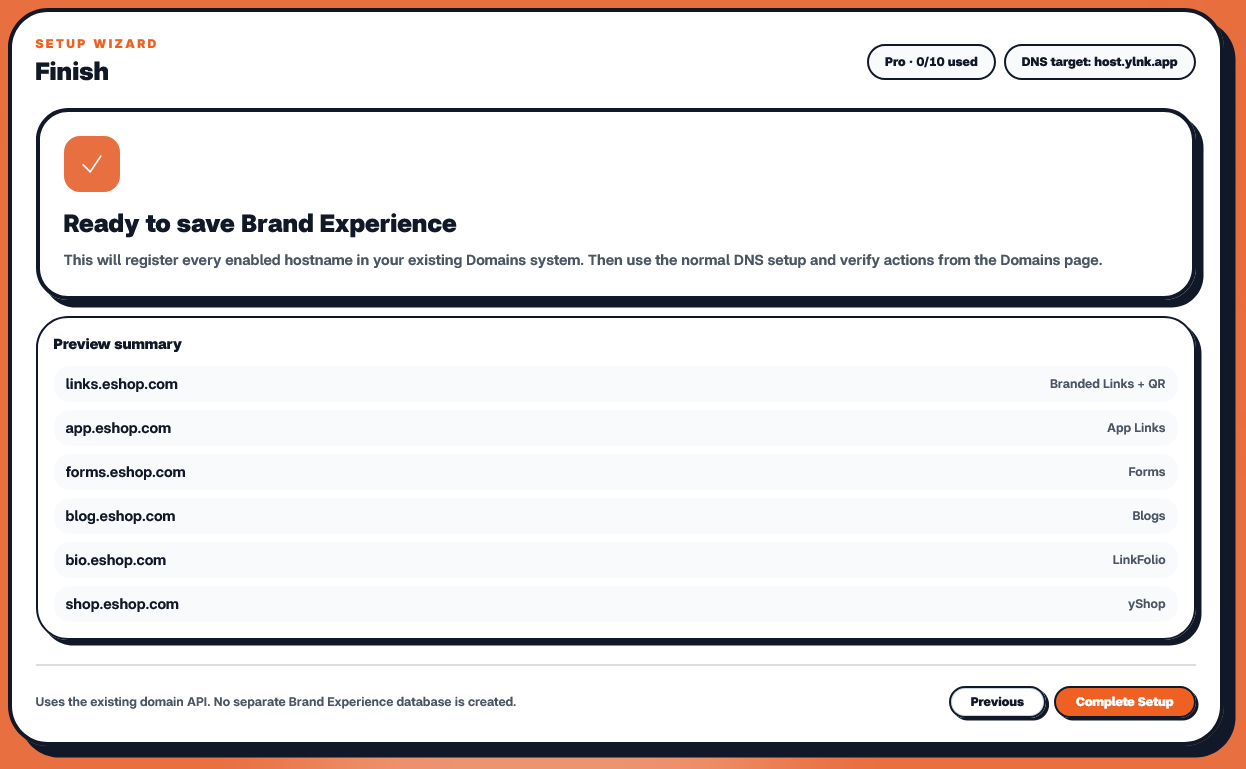 Before finishing, yLnk gives you a complete overview of what you're about to configure.
You'll be able to review:
🪪 Brand
Romman's Brand
🌐 Root Domain
mybrand.com
🎯 Priority
Commerce First
🧩 Branded Services
mybrand.com
    └── 🛍️ yShop

links.mybrand.com
    └── 🔗 Short Links

apps.mybrand.com
    └── 📱 App Links

forms.mybrand.com
    └── 📋 Forms

blog.mybrand.com
    └── 📝 Blog
Everything is visible before you finish.
No guessing.
No hidden domain assignments.
Just one final review.
🎉 Finished!
Once the configuration is complete, your brand has a structured digital environment around its own domain.
Instead of:
some-link-tool.com/abc
some-form-service.com/xyz
some-shop-platform.com/mybrand
some-blog-platform.com/mybrand
you have:
                    🌐 mybrand.com
                          │
          ┌───────────────┼───────────────┐
          │               │               │
         🔗              📱              📋
       Links             Apps            Forms
          │               │               │
          └───────────────┼───────────────┘
                          │
                  ┌───────┴───────┐
                  │               │
                 📝              🛍️
                Blog            Store
Everything has a purpose. Everything belongs to your brand.
💡 Why Purpose-Specific Hostnames?
A hostname shouldn't just look branded.
It should communicate what happens there.
Compare:
mybrand.com/a8X92
with:
links.mybrand.com/a8X92
The second immediately tells you:
🔗 This is a branded link.
Likewise:
forms.mybrand.com/customer-feedback
is immediately understandable.
And:
blog.mybrand.com/article-name
feels like your brand's own publication, not a random external service.
That's the idea behind purpose-specific branded hostnames.
🔐 One Hostname. One Service.
Brand Experience follows a simple architecture rule:
A branded domain slot belongs to one service only.
For example:
links.mybrand.com → Short Links
shouldn't simultaneously become:
links.mybrand.com → Blog
Keeping one hostname tied to one product purpose makes your domain structure clean and predictable.
It also makes it easier to understand and manage your brand as it grows.
🧠 Built on the Existing yLnk Domains System
Brand Experience doesn't create a completely separate domain-management system.
The configured branded hostnames are saved through the existing yLnk Domains system, with each domain slot associated with its intended product purpose.
So the architecture remains simple:
Brand Experience Setup
          │
          ▼
    Domain configuration
          │
          ▼
    Existing Domains
          │
          ├── 🔗 Links
          ├── 📱 Apps
          ├── 📋 Forms
          ├── 📝 Blog
          └── 🛍️ Store
The wizard handles the setup experience.
The existing Domains system handles the domain records.
🚀 Your Domain Becomes Your Digital Infrastructure
Your domain shouldn't just be an address.
It can become the foundation connecting every digital experience your brand provides.
mybrand.com
can become the starting point for:
🔗 Links
📱 Apps
📋 Forms
📝 Content
👤 LinkFolio
🛍️ Store
—all while maintaining a consistent branded identity.
🌐 One domain. Multiple experiences. One brand.
That's the idea behind yLnk Brand Experience.
Bring your domain. Choose your purpose. Connect your DNS. Build your brand.